Service/Program cards do not get manually removed from within an Area of Support page. Instead, they are removed by going into each Service/Program page and deselecting the appropriate area(s)of support checkbox(es). Once this is done, the service/program card will automatically stop appearing from under the “Our Programs” section of the Area of Support page.
Follow the instructions below to do so:
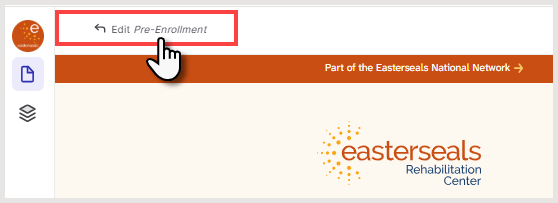
- Open the Service/Program page
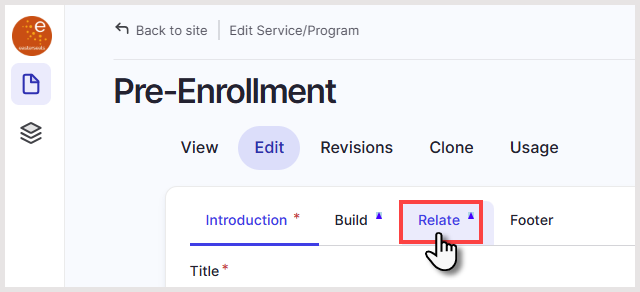
- Click the Relate tab
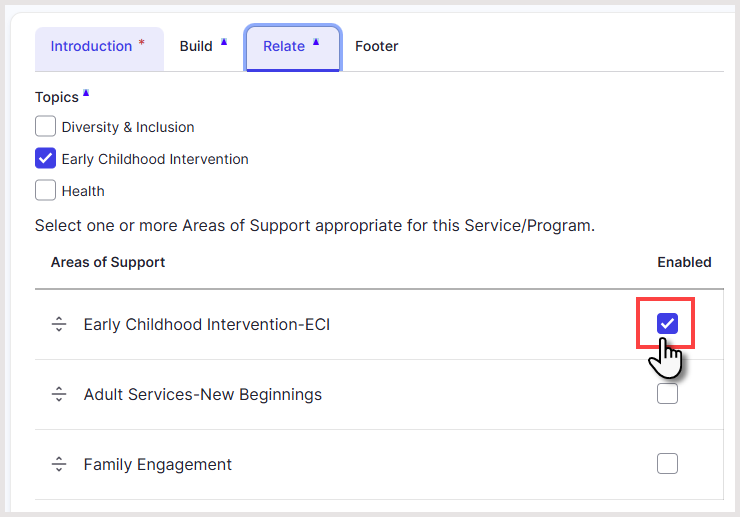
- Under the Areas of Support section, uncheck the area of support to remove the association
- Click Save
- Repeat steps 1-4 for other service/program cards you wish to remove
✅ Result:
- The Service/Program will immediately stop appearing on that Area of Support page.
- The Area of Support page updates automatically—no changes are needed there.
Was this article helpful?
That’s Great!
Thank you for your feedback
Sorry! We couldn't be helpful
Thank you for your feedback
Feedback sent
We appreciate your effort and will try to fix the article