- Adjust the focal point
- When you upload an image, you have the option to set a focal point: the place the image centers regardless of size.
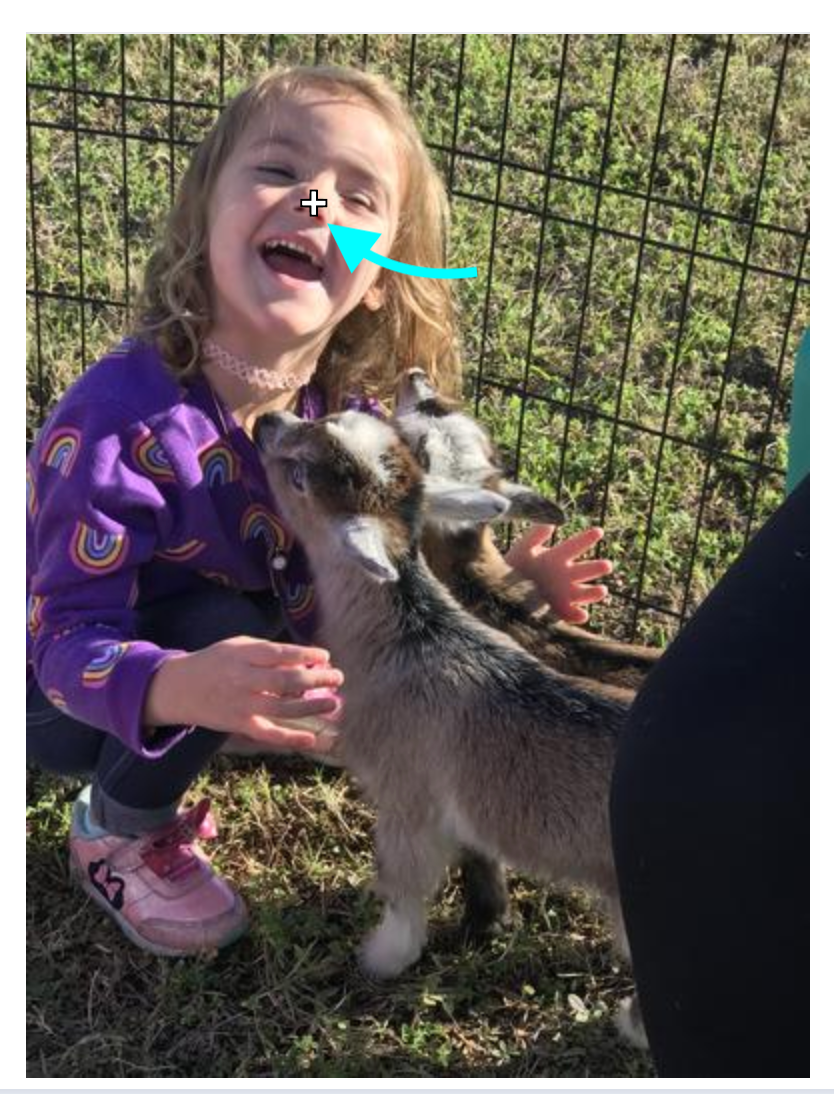
- Move the crosshairs tool (white plus sign) to manually set the focal point. For photos of a person, move it near the nose.
- Use naming conventions
- Patterns like [Year] [Event Title/Person’s Name] [detail] make it much easier to find photos later. Examples:
- 2018 - Annual Fundraiser - auction table
- 2018 - Jane Doe - headshot
- Patterns like [Year] [Event Title/Person’s Name] [detail] make it much easier to find photos later. Examples:
- Use Tags
- Tags help you and future content editors search for photos. This is particularly helpful for finding stock photos v. ones of your audience. Consider:
- Stock
- Headshot
- Children
- Program/service name
- Tags help you and future content editors search for photos. This is particularly helpful for finding stock photos v. ones of your audience. Consider:
- Follow the image size requirements
Was this article helpful?
That’s Great!
Thank you for your feedback
Sorry! We couldn't be helpful
Thank you for your feedback
Feedback sent
We appreciate your effort and will try to fix the article